

Bouncerate
Bounce rate is an important metric in web analytics that indicates the percentage of visitors who leave your website after viewing only one page, without further interaction or clicking through to other pages on the same site. In other words, a bounce occurs when a user arrives on your website and immediately leaves without clicking through or taking any other action.
The bounce rate is calculated by dividing the number of bounces by the total number of visits to a page, and it is often expressed as a percentage. For example, if 100 people visit a page and 50 of them leave the site after viewing that one page, the bounce rate is 50%.
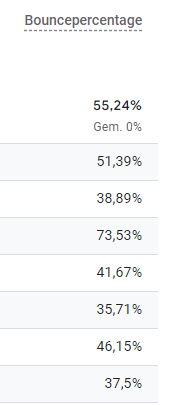
Bounce rate in GA4
Why is Bounce Rate Important?
Bounce rate is often used as an indicator of how effective a web page is at engaging visitors and encouraging them to navigate further through the site. While a high bounce rate is not always bad, in many cases, it can indicate that the content or user experience on the page does not match visitors’ expectations.
Why bounce rate is important:
1. Insight into User Behavior
Bounce rate provides insight into how users interact with your website. A high bounce rate might mean that visitors aren’t finding what they’re looking for or that the page isn’t engaging enough for them to explore further. This could indicate issues with the content, design, page load speed, or the page’s relevance to the search query.
2. Indicator of Page Relevance
A high bounce rate may suggest that the content on the page is not relevant to visitors’ expectations. This can happen if the keywords you’re using to attract traffic don’t align well with the content on the page, causing visitors to leave quickly.
3. Impact on SEO
Although Google has not explicitly confirmed that bounce rate is a direct ranking factor, a consistently high bounce rate, combined with other signals (such as short visit duration), could lead search engines to believe that your pages are not meeting user expectations. This may eventually result in lower rankings.
4. Improving User Experience
By monitoring your bounce rate, you can gain insight into which pages need improvement. Whether it’s optimizing content, improving page load speed, or adjusting the user experience, reducing your bounce rate can lead to an overall better user experience on your website.
What is a “Good” Bounce Rate?
What is considered a “good” bounce rate can vary depending on the type of website and its goals. Here are some general guidelines:
- Blogs: For blogs, a higher bounce rate (50% to 70%) is normal, as visitors often come for a specific article and then leave.
- E-commerce sites: For e-commerce websites, a lower bounce rate (20% to 40%) is ideal because you want visitors to browse through your product pages and eventually make a purchase.
- Service pages and landing pages: Landing pages designed for conversion should have a bounce rate between 30% and 50%, depending on the complexity of the conversion action.
How to Lower the Bounce Rate?
If you notice that your bounce rate is higher than desired, there are several strategies you can implement to reduce it:
1. Improve Page Speed
A slow loading time is one of the main reasons visitors leave a page early. Make sure your website loads quickly by optimizing images, minimizing unnecessary scripts, and using caching.
2. Optimize Content Relevance
Ensure that the content on your page closely matches the keywords and expectations of your visitors. This may mean revising your keywords, clarifying headings, or creating more targeted content.
3. Simplify Navigation
Clear and user-friendly navigation helps visitors easily find other pages on your website. Ensure that important links are highly visible and that your site’s structure is logical and intuitive.
4. Add Internal Links
Internal links encourage visitors to click through to other related content on your site. This can help keep them engaged longer and guide them through your site.
5. Create Visually Appealing Pages
Ensure that your pages are visually appealing with a clean and modern design that resonates with your target audience. Good visual elements can capture visitors’ attention and encourage them to explore further.
6. Provide a Clear Call-to-Action (CTA)
A clear and compelling call-to-action (CTA) can help visitors understand what the next step is. This could be filling out a form, clicking through to another page, or making a purchase.
Improving Website Performance
Bounce rate is an important metric for understanding how effective your website is at engaging visitors and encouraging them to navigate further. While a high bounce rate can sometimes indicate underlying issues, its interpretation heavily depends on the type of page and the goals of your website. By focusing on improving user experience, providing relevant content, and optimizing your site, you can lower the bounce rate and enhance your website’s performance.
Bounce rate is an important metric in web analytics that indicates the percentage of visitors who leave your website after viewing only one page, without further interaction or clicking through to other pages on the same site. In other words, a bounce occurs when a user arrives on your website and immediately leaves without clicking through or taking any other action.
The bounce rate is calculated by dividing the number of bounces by the total number of visits to a page, and it is often expressed as a percentage. For example, if 100 people visit a page and 50 of them leave the site after viewing that one page, the bounce rate is 50%.
Bounce rate in GA4
Why is Bounce Rate Important?
Bounce rate is often used as an indicator of how effective a web page is at engaging visitors and encouraging them to navigate further through the site. While a high bounce rate is not always bad, in many cases, it can indicate that the content or user experience on the page does not match visitors’ expectations.
Why bounce rate is important:
1. Insight into User Behavior
Bounce rate provides insight into how users interact with your website. A high bounce rate might mean that visitors aren’t finding what they’re looking for or that the page isn’t engaging enough for them to explore further. This could indicate issues with the content, design, page load speed, or the page’s relevance to the search query.
2. Indicator of Page Relevance
A high bounce rate may suggest that the content on the page is not relevant to visitors’ expectations. This can happen if the keywords you’re using to attract traffic don’t align well with the content on the page, causing visitors to leave quickly.
3. Impact on SEO
Although Google has not explicitly confirmed that bounce rate is a direct ranking factor, a consistently high bounce rate, combined with other signals (such as short visit duration), could lead search engines to believe that your pages are not meeting user expectations. This may eventually result in lower rankings.
4. Improving User Experience
By monitoring your bounce rate, you can gain insight into which pages need improvement. Whether it’s optimizing content, improving page load speed, or adjusting the user experience, reducing your bounce rate can lead to an overall better user experience on your website.
What is a “Good” Bounce Rate?
What is considered a “good” bounce rate can vary depending on the type of website and its goals. Here are some general guidelines:
- Blogs: For blogs, a higher bounce rate (50% to 70%) is normal, as visitors often come for a specific article and then leave.
- E-commerce sites: For e-commerce websites, a lower bounce rate (20% to 40%) is ideal because you want visitors to browse through your product pages and eventually make a purchase.
- Service pages and landing pages: Landing pages designed for conversion should have a bounce rate between 30% and 50%, depending on the complexity of the conversion action.
How to Lower the Bounce Rate?
If you notice that your bounce rate is higher than desired, there are several strategies you can implement to reduce it:
1. Improve Page Speed
A slow loading time is one of the main reasons visitors leave a page early. Make sure your website loads quickly by optimizing images, minimizing unnecessary scripts, and using caching.
2. Optimize Content Relevance
Ensure that the content on your page closely matches the keywords and expectations of your visitors. This may mean revising your keywords, clarifying headings, or creating more targeted content.
3. Simplify Navigation
Clear and user-friendly navigation helps visitors easily find other pages on your website. Ensure that important links are highly visible and that your site’s structure is logical and intuitive.
4. Add Internal Links
Internal links encourage visitors to click through to other related content on your site. This can help keep them engaged longer and guide them through your site.
5. Create Visually Appealing Pages
Ensure that your pages are visually appealing with a clean and modern design that resonates with your target audience. Good visual elements can capture visitors’ attention and encourage them to explore further.
6. Provide a Clear Call-to-Action (CTA)
A clear and compelling call-to-action (CTA) can help visitors understand what the next step is. This could be filling out a form, clicking through to another page, or making a purchase.
Improving Website Performance
Bounce rate is an important metric for understanding how effective your website is at engaging visitors and encouraging them to navigate further. While a high bounce rate can sometimes indicate underlying issues, its interpretation heavily depends on the type of page and the goals of your website. By focusing on improving user experience, providing relevant content, and optimizing your site, you can lower the bounce rate and enhance your website’s performance.
